SkyView Version 2.6

Version 2.6 of SkyView has been released. The major change is largely invisible to the users. When using the Clip sampler on large images we sometimes run into a problem where the corners of a user pixel when transformed into the survey projection, straddle a cut in the image. E.g., if the survey is an all-sky Cartesian projection, a user pixel crossing Longitude=180 may have corners to the far right and left of the survey image.

A new set of classes deals with straddles in Aitoff, Cartesian, TOAST and TEA projections. An update for the CSC projection should be available soon. Straddles are not an issue in projections like the Tangent plane (gnomonic) projection where there are no cuts in the image. The previous code could incorrectly sample data along the projection cuts.

Version 2.6 allows multiple values for the scaling keyword so that different surveys can be scaled differently. This can be especially useful for RGB imags.

A facility for allowing lower resolution images to be used when a user requests very large regions has been added to help support new optical surveys. This may be the first step in the direction of supporting hierarchical resolution images, a la, Google Sky and WWT.

The offset command used when drawing over an image has been enhanced. By default offsets are made starting at the center of the image. Instead of specifying two numeric values for the offset, an offset string of “++”, “+-“, “-+”, or “–” may be given to offset to one of the corners of the image where the first character refers to the X-axis and the second to the Y-axis. Offsets are added together so, e.g., to put draw text 100 pixels above and to the left of the lower right hand corner we could use the commands

   offset +-
   text -100 100 0 MyText

or

   offset +-
   offset -100 100
   text 0 0 0 MyText
Posted in Announce, releases | Tagged , | 2 Comments

Features in the Gallery: Image boundaries

One of the images that had gotten temporarily concealed in our Gallery was

DSS2 Red: 2nd Digitized Sky Survey (Red)

Center: 12 53 36, -60 20 00
Created: 2009-10-20 02:48:39

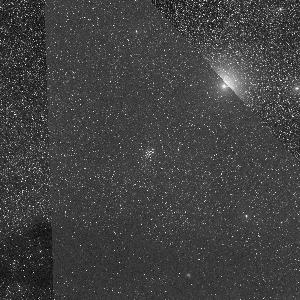
There are a couple of weird things going on here. There’s a galaxy which seems to be cut off with a sharp edge. And the quality of the image seems to change abruptly along two lines. What’s going on here?

This is a DSS2 image. The DSS2 survey data are Schmidt plates, about 6 degrees on a side. Especially in the southern hemisphere there’s a fair bit of overlap on the plates, and a single region may be covered by multiple images. For each pixel SkyView uses the image where that pixel is the furthest from the edge of the plate. It looks like this region has data from at least 3 plates. What we are seeing is the boundaries between the plates. The image in the top right corner is deeper than the one on the center, so that it shows the outer region of the galaxy while the central image only shows the core.

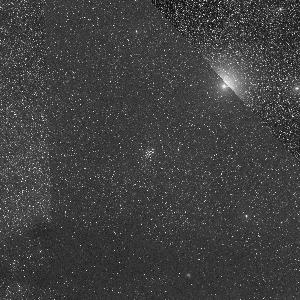
Usually SkyView does a better job of joining DSS2 images. Since the 0 point of the plates is pretty arbitrary, SkyView normally looks at the image boundaries and adds an offset to each image so that as we go from one image to another the median shift is 0. This ‘Edge reduction’ option can be turned off. For most surveys that’s the default, but it is turned on by default for some of the optical surveys including the DSS. If we turn it off the image becomes

The boundaries are even more pronounced now. In this case maybe that’s better, since it makes it clearer what’s going on. Most of the time, though, the Edge reduction does a pretty good job of matching the images. The problems tend to arise when there are strong intensity gradients over one or more of the images. We’re only matching a 0 point and not a slope so even if these intensity gradients are real rather than some background effect, the slopes in the different images may not match.

Posted in Discussion | Tagged , , | 1 Comment

SkyView Image Gallery – missing images

Due to a programming bug SkyView images that were been submitted to the Image Gallery since the end of August 2009 have not been displayed. The bug has been fixed and all submitted images now appear in the gallery.

Thanks you for all your submissions!

Posted in Notices | Tagged | Leave a comment

SkyView Blog Housekeeping

We have upgraded our blog software and all seems normal. Let us know if you see otherwise.

Posted in Uncategorized | Tagged | 3 Comments

SDSS DR7 now available

SkyView is now using the DR7 release of the Sloan Digital Sky Survey (SDSS) surveys. It doesn’t appear that there is a big difference for SkyView between the DR6 and DR7 releases but there is a bit more coverage in a few areas.

Posted in Announce, Notices, releases | Tagged | Leave a comment

SkyView bug fix and security improvements

A software update was released today that includes a bug fix and improvements to the user input validation process.

The bug that was causing the name resolver argument to be ignored has been fixed. Due to the bug all positions were being processed using the default setting which checks the SIMBAD service before checking the NED service. Now positions are being processed as specified by the user. We apologize if this has caused any confusion.

We have put in place more stringent input validation procedures to prevent processing of malicious data. In some cases incorrect but innocuous input that was previously accepted may result in the termination of a query. We hope that our error messages will provide enough information for the user to be able to correct the input. If not please let us know.

Posted in releases | Tagged , | 1 Comment

RGB Image Overlays using SkyView clients

SkyView provides two ways to generate images on local machines – the java based SkyView-in-a-Jar application and the Perl based skvbatch program. Most tasks are straight forward using either client.

java -jar skyview.jar Position=m101 survey=DSS Return=jpg size=.25 Pixels=500 output=java_out

skvbatch Position=m101 Survey=DSS Return=jpg Size=.25 Pixels=500 file=skvbatch_out.jpg

image of m101

Creating RGB images using the SkyView-in-a-Jar application is also straight forward:

java -jar skyview.jar Survey=DSS1R,DSS,DSS1B rgb Return=jpg output=java_m101 Position=m101 Size=.25 Pixels=500

However creating the same image using the skvbatch program is a bit more involved. The skvbatch script was designed to return a single output file. With RGB requests there are four images produced – 3 FITS files and one image file. To retrieve the image file the RETURN=filename parameter setting can be used to retrieve the name “stem” of the file and then URLs can be built to retrieve any of the files.

If, for example, skvbatch returns a value XXX then the four files are:

http://skyview.gsfc.nasa.gov/tempspace/fits/XXX_1.fits
http://skyview.gsfc.nasa.gov/tempspace/fits/XXX_2.fits
http://skyview.gsfc.nasa.gov/tempspace/fits/XXX_3.fits
http://skyview.gsfc.nasa.gov/tempspace/fits/XXX_rgb.jpg

With this “stem” you can easily retrieve the JPEG image directly. Here is a little C shell script that you can use to get RGB JPEGs:

#!/bin/csh

set name=`skvbatch survey=dss,dss2b,dss2r rgb=t position=3c273 return=filename`

wget http://skyview.gsfc.nasa.gov/tempspace/fits/${name}_rgb.jpg -O rgb.jpg

For more information please visit the Running SkyView on Your Machine page.

Posted in Discussion | Tagged , , , | 5 Comments

Features in the Gallery: Saturn

Saturn Nebula

This recently submitted image looks nothing like the ringed planet Saturn we all know and love.

It turns out that there is a planetary nebula named the Saturn Nebula. SkyView displays images of objects outside our solar system so when “saturn” was entered as a target on the SkyView Query Form the name resolvers we use to identify coordinates returned coordinates for the Saturn Nebula. Planetary nebulae are clouds of interstellar matter ejected by stars as they die. Planetary nebulae are not related to planets but were given the name when they were discovered because they looked like gaseous planets.

The Saturn Nebula is also known as NGC 7009 and is in the constellation Aquarius approximately 1400 light years away. Here is another image of this object.

Posted in Discussion | Tagged | 5 Comments

Features in the Gallery: Color

There has been a whole series of beautiful color images posted to the Gallery recently. Some one (or ones) has been using SkyView‘s RGB capabilities to combine data from multiple surveys into color images. This first image of the center of the Galaxy is one nice example.Center of the galaxy

The mood is quite different in this brooding skyscape around M78.

SkyScape around M78

Take a look in the Gallery and find your favorites. Or use the RGB overlays settings to generate your own. Generally to produce interesting pictures you’ll want to use surveys with comparable resolution.

Posted in Discussion | Tagged , | 2 Comments

New SkyView Survey: WMAP

Microwave data from the WMAP (Wilkinson Microwave Anisotropy Probe) mission are now available in SkyView. WMAP is the first fine-resolution (0.2 degree) all-sky map of Cosmic Microwave Background (CMB) radiation. For more information see our Survey Information page and the WMAP archive site.

Posted in Announce, releases | Tagged , , | 2 Comments